|
Panoramica comandi
GUI and Navigator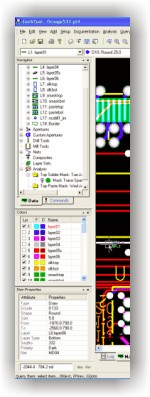
Through the Navigator, you can access vital information about any
design: layer information, aperture data, net connectivity,
composites, and layer sets. You can set up layer structures by
tagging and moving layers into the appropriate order. Blind and
buried layer sets can be quickly and easily defined. Apertures can
be selected, added, changed, and even dropped into a specific
location through drag-and-drop techniques.
You can access all analysis results
for processes like Design/Manufacturing Rules Checking, Design For
Fabrication, Graphical Netlist Comparison, and even Compare Layers.
Additionally, you have full access to
the GerbTool command structure. You can execute individual commands
and build a quick “My Commands” list of those commands which are
used on a regular basis. Even macros can be accessed and executed
here. Again, all of this is performed from a centralized location,
virtually eliminating the need for menus and toolbars.
Support for More than Just
Gerber
Enhanced!
You will be pleased to find that GerbTool includes an Import Wizard
that goes beyond just importing Gerber data. Using the Import Wizard,
you simply direct GerbTool to the location of your data, and it does
the rest by detecting the various database formats (Gerber, Drill,
Mill, HPGL, DXF, etc.) automatically. If you still use 274D, it will
even detect aperture table formats and convert them as well.
GerbTool still has format-specific interfaces for all supported
database types (Gerber, Barco DPF, DXF, HPGL & HPGL/2, Excellon,
Sieb & Meyer, IPC-D-356A, etc.) just in case you are interested in
loading a single file or re-loading existing files.
If you have already made the
transition away from Gerber data towards a more intelligent method
of transfer data from Design to Manufacturing, the you will be happy
to find that GerbTool GT-Communicator, GT-Inspector, and GT-Designer
come standard with interfaces to formats such as ODB++, ODB++ XML,
IPC-2581 (OffSpring). There are optional interfaces also available
for DirectCAM (Import Only), and PADS ASCII (Import Only). These
formats provide users of GerbTool with the ability to achieve the
maximum data transfer of design information to manufacturing for
improved quality and reliability during the fabrication of any job
flow. Interfacing with other systems has never been easier; take a
look at the broad range of support that comes as a result of these
formats:
| Altium |
|
| P-CAD |
=ODB++ |
| Altium Designer |
=ODB++ |
| |
|
| Cadence |
|
| Allegro & Allegro Studio |
=ODB++ |
| OrCAD Layout |
=ODB++ |
| |
|
| Frontline Solutions |
|
| Genesis2000 |
=ODB++ or IPC-2581 (when
released) |
| |
|
| Mentor Graphics |
|
| BoardStation |
=ODB++ |
| Expedition |
=ODB++ or IPC-2581 (when
released) |
| PADS |
=PADS ASCII or DirectCAM |
| |
|
| Valor Computerized
Systems |
|
| Enterprise3000 |
=ODB++ or IPC-2581 (when
released) |
| |
|
| Zuken |
|
| CADSTAR |
=ODB++ |
Intrinsic Apertures
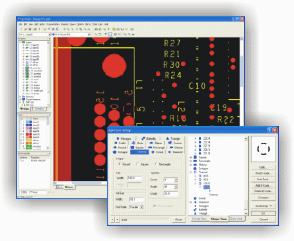
GerbTool supports 26 intrinsic aperture types, with full support for
ODB++™ intrinsic apertures. Make quick work out of rounded
rectangles, square thermals, thermal reliefs, and more.
Graphical Aperture Rule Creator
Let GerbTool eliminate the hassle of reading "one-off"
aperture list formats through the use of our new graphical Aperture
Rule Creator. Aperture lists are visually displayed, and you can
just point-and-click to define columns, shape types, etc. GerbTool
automatically builds your rule file, and lets you save it so it can
be used again.
Optimizations
Everything you need to optimize a design for manufacturing is just a
mouse-click away with GerbTool. Functions such as Draw-to-Flash
conversion, Teardropping, converting those nasty special pad shapes
(the ones that are always drawn) into flashes, and more. You can
even eliminate those 274X composites that your CAD system might be
outputting using our Flatten Composite function.
Automatic Drawn Pad Conversion
will process an entire data sets “hands-off” while using your Solder
Mask layer as a guide to help eliminate errors and increase
performance.. Not only will Automatic Drawn Pad Conversion process
your data significantly faster than ever before, it will do it with
the added benefit of maintaining pads such as rounded rectangles
with standard intrinsic apertures – there is no need for custom
apertures. In cases were a conversion could not occur and error is
logged within the Analysis tree of the Navigator, where the user can
review and correct as required.
 Solder
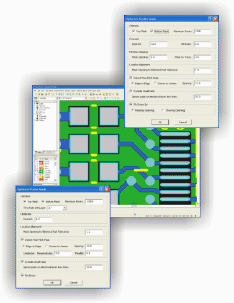
Mask Generation & Optimization will create a perfect solder
mask layer for you, using a comprehensive set of rules that are
designed to give you maximum possible clearance while maintaining
optimal coverage throughout your design. Special support for
fine-pitch pads is provided, with automatic generation of block
openings for those areas to prevent web (sliver) problems between
pads. Existing solder mask layers can also be optimized to conform
to your rule sets using the Solder Mask Optimizer. Solder
Mask Generation & Optimization will create a perfect solder
mask layer for you, using a comprehensive set of rules that are
designed to give you maximum possible clearance while maintaining
optimal coverage throughout your design. Special support for
fine-pitch pads is provided, with automatic generation of block
openings for those areas to prevent web (sliver) problems between
pads. Existing solder mask layers can also be optimized to conform
to your rule sets using the Solder Mask Optimizer.
Paste Mask Generation &
Optimization will be appreciated by any Designer and/or Stencil
Manufacturer. Like the Solder Mask Generator, it is driven by a
comprehensive set of rules that are designed to give you optimal
reduction across a wide variety of pad shapes and sizes. Special
support for fine-pitch pads allows for independent X and Y
reductions to eliminate paste build-up between pads. If you already
have a paste mask layer but are not satisfied with it, let the Paste
Mask Optimizer rework it to conform to your rules.
Stencil Enhancements feature
was first introduced in GerbTool version 14. In working with some of
our existing stencil users we have further optimized the Stencil
Enhancement feature to be more flexible in its ability to
accommodate a wide range of processing techniques. Originally the
Stencil Enhancement feature was designed to work in conjunction with
the Paste Mask Generator/Optimizer; however there are times when the
need to work from an existing paste mask layer, without any
optimization, is needed to enhance those openings necessary so as to
comply with your customers requirements. Now you can increase or
decrease openings while simultaneously adjusting the shape
configuration of a particular pad-pair. In addition, rounded corners
can be applied to all enhanced shapes. You will also benefit from
the ability to work with either percentages or physical amounts when
developing your rules for pad-pair enhancement. You can now
“justify” your enhanced openings along any edge of the copper pad
that the opening is associated with.
Basic Panelization is simple
and straightforward in GerbTool. You have the option of working
fully automatic, letting GerbTool calculate copies based upon
various spacing rules, or performing a more traditional lay-up based
on offset values from the origin. As an added bonus, GerbTool has
the ability to quickly step-and-repeat more than one design. All of
this will help you to create assembly panel arrays quickly and
efficiently.
HyperNETLIST Generation
New!
GerbTool provides class-leading performance with HyperNETLIST
generation. Even the toughest designs can be processed in a matter
of just a few minutes. For example a 12”x12” 16-layer board design
with 4mil traces on 4mil spaces can be processed in approximately
10-minutes on a 3Ghz P4 based PC, as compared to 30-45 minutes of
our typical competitors. This kind of performance puts GerbTool on
par with systems costly tens of thousands of dollars more.
MCM/LTCC Layer Stack-Up
means that users can perform a Netlist Generation on their ceramic
or foil-based designs. Unlike competitive systems that are limited
to just Gerber layers representing insulators, GerbTool allows you
to specify Gerber or NC layers as insulators, accommodating a wider
array of data input from various CAD systems.
 HyperNETLIST
Comparison
Enhanced! HyperNETLIST
Comparison
Enhanced!
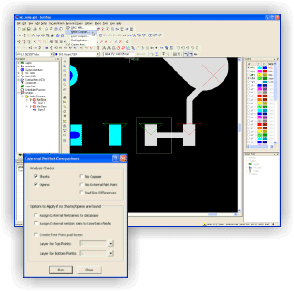
Using GerbTool's Graphical Netlist Compare you can finally get
feedback that makes sense. Some competitive tools only provide you
with a generic ASCII text reports; with GerbTool you can see your
problems on the screen. Netlist compare finds Shorts, Opens, Nets
without Copper, No External Net Points, and Test Pad Size
Differences. Each violation is easily accessible through the
Navigator.
Pin-Point Error capabilities
help speed the process of troubleshooting problems. Mere graphical
rendering of the errors isn’t always enough particularly on more
complex nets. Users will appreciate GerbTool’s ability to track down
the actual location of Shorts and Opens. The faster you can locate
your problem the sooner you can resolve it and get your design out
for production.
External Net access allows
users to graphically see how a set of external net points might
compare with an internal net. This information, when combined with
Pin-Point Errors, can dramatically aid in your troubleshooting
process.
Dynamic DfM Analysis
Suite
Enhanced!
GerbTool includes a very comprehensive dynamic analysis “suite”
which covers Design Information, Design Rules Checking or
Manufacturing Rules Checking, Design for Fabrication, Netlist
Comparison, and even Embedded Passive Checking. You are provided
with 75+ checks to help insure that a given design is "manufacturable."
The “dynamic checklist” environment allows for
"single-pass" testing of an entire design, even if you want to
check for 5 mil spacing on the top and bottom sides, but need 8 mil
spacing on the internal layers.
Design Information Analysis
provides 25 “quick” board level queries. These queries are
used primarily for a broad overview of any given design for quoting
purposes. All queries are reported back on a layer-by-layer basis.
Some of the more popular checks include Minimum Air Gap, Minimum
Trace Width, Hole Counts, Board Size, and Conductive Layer Count.
Field Applications Engineers should find these new features
particularly useful for the purposes of quoting new jobs and putting
together a design summary prior to submitting a job to production.
DRC/MRC Analysis consists of
typical checks like Trace-to-Trace, Trace-to-Pad, Pad-to-Pad,
Drill-to-Pad, Drill-to-Plane, Minimum Trace Width, Solder Mask
Spacing and Annular Ring Clearances for pads and drills, SMD Pitch &
Spacing, Silkscreen on Pads, etc.
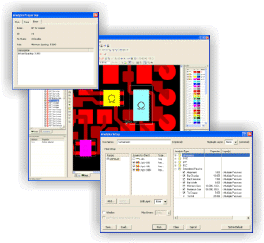 Embedded
Passive Analysis (optional) provides verification support
to the growing Embedded Passive market. Designers no longer need to
agonize over a lack of verification capabilities within their CAD
systems when they design with passive resistors. GerbTool will
verify such aspects of passive devises as Resistor-to-Terminator
Alignment, Minimum Overlap, Termination Pad Width and Extension, and
more. You can work with either Additive or Subtractive passive
materials. We've even added utilities for verifying your resistor
values, and output reports designed to help your fabricator during
production. Embedded
Passive Analysis (optional) provides verification support
to the growing Embedded Passive market. Designers no longer need to
agonize over a lack of verification capabilities within their CAD
systems when they design with passive resistors. GerbTool will
verify such aspects of passive devises as Resistor-to-Terminator
Alignment, Minimum Overlap, Termination Pad Width and Extension, and
more. You can work with either Additive or Subtractive passive
materials. We've even added utilities for verifying your resistor
values, and output reports designed to help your fabricator during
production.
NC Drill & Mill
Our completely new NC Drill and Mill support will
finish off your tooling processes with features such as:
-
Advanced Tool Table Support
provides total control over drill charts; supports plated and
unplated tools for increased compatibility with today's CAD systems;
mixed tables, supporting both drill and mill tools, can now be
generated for increased compatibility with modern NC equipment.
Define NC Feeds and Speeds, and Plunge and Extract Rates, to
accomodate a wide range of material usage and stack-up requirements.
-
Multiple Tool Tables
support designs with blind & buried vias; plated versus non-plated
drill layers with separate tool tables can be accomodated, while
still maintaining yet another table for milling; fabricators can now
have standardized tool tables that are built around their shop floor
tooling, and map a customer's tool information to their standard
tables with ease.
-
NC Compensation Index Tables
allow you to control the compensation index for each tool, allowing
for support of unique requirements such as finish sanding, and
allows the NC operator to make minor adjustments at the machine,
rather than sending the job back to CAM for reprocessing.
-
NC Tool Linking & Maximum Hits
increases the life of old equipment that does not have automatic
tool break detection or automatic linking. Change tools
automatically with no intervention from the operator.
-
Tool Reordering for Export
allows you to change the export order of your tools to accomodate
specific shop processes. Easily adapt a customer-provided tool list
to your shop-defined tool list.
-
User-Defined Break Tabs
allow you to build custom break tab libraries by saving your
definitions and reloading as needed in new jobs. Support for 5
different tab types: simple, stitched, double-stitched, crown, and
crown break with stitching. Place tabs on linear segments, arcs, or
circles -- with or without compensation.
-
Interactive Milling
allows you to create mill paths using standard "draw" and "edit" commands,
even using arcs to provide smooth, flowing mill paths on flex
designs or irregular-shaped boards. Move data back and forth between
Gerber and NC layers; GerbTool will automatically make the
translation.
-
Drilled Text allows
you to drill part numbers, job numbers, etc. into your panels,
utilizing the "canned" feature within the Excellon or Sieb & Meyer
format to allow for automatic compensation of tool size.
-
Operator Messages & Stop
Commands allow CAM operators to stop machines and/or prompt
NC operators with specific messages while a job is in process.
Advanced Panelization
(optional)
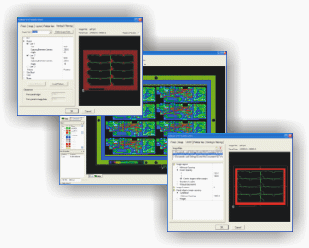 GerbTool's Advanced Panelization
provides a fully self-contained environment that lets you store an
unlimited number of panel templates. You can build templates for
each of your shop's standard panel sizes, so you'll never have to
define another panel configuration again! Multi-job panelization has
become more and more popular for optimizing tooling output for
prototypes, limited piece count production, and assembly panels.
GerbTool supports stepping and repeating multiple jobs within a
single panel. GerbTool's Advanced Panelization
provides a fully self-contained environment that lets you store an
unlimited number of panel templates. You can build templates for
each of your shop's standard panel sizes, so you'll never have to
define another panel configuration again! Multi-job panelization has
become more and more popular for optimizing tooling output for
prototypes, limited piece count production, and assembly panels.
GerbTool supports stepping and repeating multiple jobs within a
single panel.
Different Robber (Galvanic) Bars,
Venting, and Thieving patterns can be defined for as many layers as
necessary through the use of layer sets. Venting and Thieving
supports solid, dot, hatch, and starburst patterns on any layer --
GerbTool can accommodate positive and negative polarities with ease.
All of these functions are performed
quickly and efficiently, without the hassle of separate editors,
special symbols, and complex user interfaces. Coupons, tooling holes,
title blocks, and even your one-up designs are just .GTD databases.
Combine as many as you like in whatever configuration you like--the
possibilities are unlimited!
Hotkey Compatibility Mode
GerbTool's Compatibility Mode emulates the hotkeys from CAM350™ and
CAMMaster™, to help new users make the transition to GerbTool more
easily.
User Configurable Toolbars
In addition to the improved Navigator, GerbTool takes toolbar usage
to the next level by allowing customization of any of the current
toolbars found within the product. Most of the menu commands have
button equivalents, which you can place anywhere on the screen for
easy access. The result is an environment that you can tailor to
your specific needs.
Automation and Scripting
Automation is the ultimate goal in almost any environment, be it
design or manufacturing, and GerbTool will not let you down. For
quick and simple scripting, GerbTool offers traditional macro
records and playbacks. But for more advanced environments, like
fabrication shops, you will find a full drag-and-drop macro
developer environment that enables anyone to produce high quality
macros with ease. Our macro developer even comes complete with a
built-in debugger at no additional charge. |